Sprites
Sprites are 2D images that always face the camera. Babylon.Blazor supports sprite managers, individual sprites, sprite-sheet animations, and callbacks when animations finish.
SpriteManager
A sprite manager holds a pool of sprite instances that share one texture (or sprite sheet):
SpriteManager spriteManager = await scene.CreateSpriteManager(
    "playerManager",                          // manager name
    "https://example.com/player.png",         // texture URL
    3,                                        // max sprites in pool
    64,                                       // sprite width in pixels
    64                                        // sprite height in pixels
);
| Parameter | Type | Description |
|---|---|---|
name |
string |
Manager name |
url |
string |
URL to the texture image or sprite sheet |
capacity |
int |
Maximum number of sprite instances |
width |
int |
Width of one sprite (or one cell in a sprite sheet) |
height |
int |
Height of one sprite (or one cell in a sprite sheet) |
Creating Sprites
Create individual sprites from the manager:
Sprite Operations
Position
Size
Parameters are height and width, both in the 0..1 range.
Frame Number
For sprite sheets, set the current frame:
Invert (Mirror)
Flip the sprite horizontally and/or vertically:
Angle
Rotate the sprite around its center:
Pickable
Control whether the sprite can be picked (clicked):
Animation
Sprites support frame-based animation:
await player.PlayAnimation(
    fromKey: 0,
    toKey: 40,
    isInLoop: false,
    startDelayMs: 100,
    onAnimationEndObjRef: DotNetObjectReference.Create(myCallbackHelper)
);
| Parameter | Type | Description |
|---|---|---|
fromKey |
int |
First frame of the animation |
toKey |
int |
Last frame of the animation |
isInLoop |
bool |
Whether the animation loops |
startDelayMs |
int |
Delay between frames in milliseconds |
onAnimationEndObjRef |
DotNetObjectReference<MessageUpdateInvokeHelper>? |
Optional callback when animation ends |
Animation Callback
To receive a notification when an animation finishes, use
MessageUpdateInvokeHelper with DotNetObjectReference:
public class MySceneCreator : SceneCreator
{
    private readonly MessageUpdateInvokeHelper _callbackHelper;

    public MySceneCreator(BabylonInstance babylonInstance, string canvasId)
        : base(babylonInstance, canvasId)
    {
        _callbackHelper = new MessageUpdateInvokeHelper(OnAnimationFinished);
    }

    public override async Task CreateAsync(BabylonCanvasBase canvas)
    {
        // ... create engine, scene, camera ...

        var spriteManager = await scene.CreateSpriteManager("manager", url, 3, 64, 64);
        var sprite = await spriteManager.CreateSprite("sprite0");

        await sprite.PlayAnimation(0, 40, false, 100,
            DotNetObjectReference.Create(_callbackHelper));

        await BabylonInstance.RunRenderLoop(engine, scene);
    }

    private void OnAnimationFinished()
    {
        Console.WriteLine("Animation finished");
    }
}
Complete Example
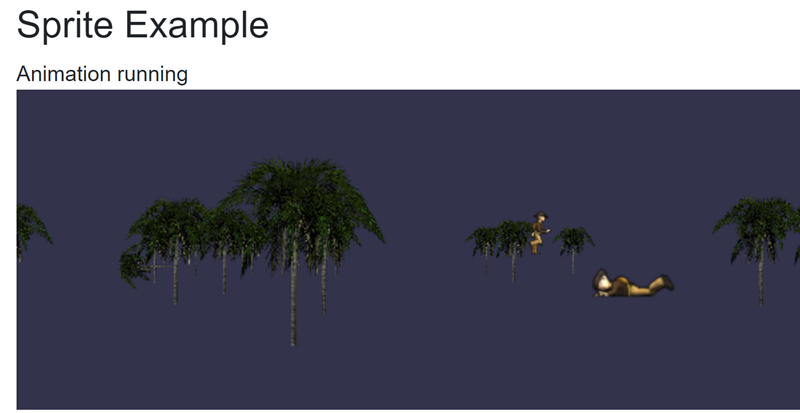
The demo application includes a SpriteExampleSceneCreator that creates a player
sprite with animation and 200 randomly placed tree sprites from two sprite sheets.
See the SpriteExample page in the demo app for the full source.
Example Output