Custom Scene
If you do not want to draw molecules, you can build any 3D scene by creating a
custom SceneCreator subclass and a custom canvas component.
Overview
A custom scene has four parts:
- Scene creator — a class that inherits
SceneCreatorand builds the scene with meshes, lights, camera, and materials. - Data class (optional) — if your scene needs data, implement
IData. - Custom canvas — a class that inherits
BabylonCanvasBaseand overridesInitializeSzeneto call your creator. - Razor component — a
.razorfile that inherits the custom canvas.
1. Create the Scene Creator
Subclass SceneCreator and implement CreateAsync. Use BabylonInstance to
create engine, scene, camera, lights, and meshes:
using Babylon.Blazor;
using Babylon.Blazor.Babylon;
using Babylon.Blazor.Babylon.Parameters;

public class MySceneCreator : SceneCreator
{
    public MySceneCreator(BabylonInstance babylonInstance, string canvasId)
        : base(babylonInstance, canvasId)
    {
    }

    public override async Task CreateAsync(BabylonCanvasBase canvas)
    {
        Engine engine = await BabylonInstance.CreateEngine(CanvasId, true);
        Scene scene = await engine.CreateScene();

        // Camera
        var cameraTarget = await BabylonInstance.CreateVector3(0, 0, 0);
        var camera = await scene.CreateArcRotateCamera(
            "Camera", 3 * Math.PI / 2, 3 * Math.PI / 8, 36, cameraTarget, CanvasId);

        // Light
        var lightDir = await BabylonInstance.CreateVector3(1, 1, 0);
        var light = await scene.CreateHemispehericLight("light1", lightDir, 0.98);

        // Add meshes
        await AddSphere(scene);
        await AddBox(scene);

        // Start render loop
        await camera.SetAutoRotate(canvas.UseAutoRotate, canvas.IdleRotationSpeed);
        await BabylonInstance.RunRenderLoop(engine, scene);
    }

    private async Task AddSphere(Scene scene)
    {
        var options = new SphereOptions { Diameter = 5.0 };
        var parameters = new MeshParameters(BabylonInstance) { Options = options };
        await parameters.SetPosition(-4.5, 0, 0);
        var sphere = await scene.CreateSphere("sphere1", parameters);

        var color = await BabylonInstance.CreateColor3(System.Drawing.Color.Aqua);
        var material = await scene.CreateMaterial("mat1", color, null, 1.0);
        sphere.SetMaterial(material);
    }

    private async Task AddBox(Scene scene)
    {
        var boxColors = await BabylonInstance.CreateFaceColors(System.Drawing.Color.Blue);
        var options = new BoxOptions { Height = 2, Width = 5.5, Depth = 0.5, FaceColors = boxColors };
        var parameters = new MeshParameters(BabylonInstance) { Options = options };
        await parameters.SetPosition(3.7, 0, 0);
        await scene.CreateBox("box1", parameters);
    }
}
2. Create the Custom Canvas
Inherit BabylonCanvasBase and override InitializeSzene to call your creator
instead of the default MoleculeCreator:
public class MyCustomCanvas : BabylonCanvasBase
{
    protected override async Task InitializeSzene(BabylonInstance babylonInstance, string canvasId)
    {
        MySceneCreator creator = new MySceneCreator(babylonInstance, canvasId);
        await creator.CreateAsync(this);
    }
}
3. Create the Razor Component
Create a .razor file that inherits your custom canvas:
4. Use It in a Page
@page "/myscene"
@rendermode InteractiveAuto

<h3>My Custom Scene</h3>

<div style="height: 600px;">
    <MyCustomCanvas CanvasId="CanvasCustom" />
</div>
Available Mesh Types
The Scene class provides these mesh creation methods:
| Method | Options class | Description |
|---|---|---|
CreateSphere |
SphereOptions |
Sphere with configurable diameter |
CreateBox |
BoxOptions |
Box with size or individual height/width/depth, supports face colors |
CreateCylinder |
CylinderOptions |
Cylinder with diameter and height |
CreateTorus |
TorusOptions |
Torus with diameter and tessellation |
CreateTube |
— | Tube between two Vector3 points with a radius |
MeshParameters
Every mesh method takes a MeshParameters object that holds:
Options— the shape-specific options (SphereOptions,BoxOptions, etc.)Position— set withawait parameters.SetPosition(x, y, z)Rotation— set withawait parameters.SetRotation(x, y, z)
Sprites in Custom Scenes
You can also create sprites in a custom scene. See Sprites
for details. The SpriteExampleSceneCreator in the demo application shows how to
create sprite managers, play animations, and receive a callback when an animation
ends.
Example Output
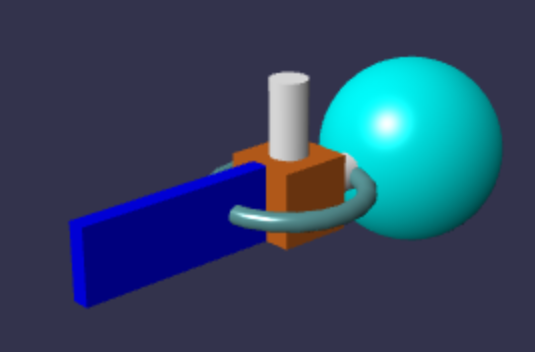
The custom scene demo renders a sphere and a colored box: