Database Comparison
DbClone includes a standalone comparison feature that lets you diff two databases without copying anything.
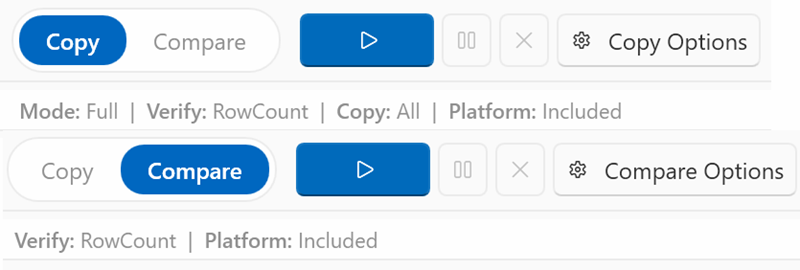
Opening the Comparison
- Select source and destination connections on the main screen
- Switch the toolbar to Compare mode
- Click the run button (▶) — or press Ctrl+Shift+C
What Gets Compared
The comparison checks multiple object types with varying levels of detail:
Table selection scopes the comparison
If a table selection is active on the source panel, only the selected tables are compared — target tables outside the selection are ignored and not reported as differences. Non-table objects are compared in full.
Tables (structural DDL diff)
Beyond presence and row counts, DbClone performs a detailed structural comparison of each table:
- Columns — name, data type, nullability, default values, identity/generated columns
- Primary keys — column list comparison
- Foreign keys — name, columns, referenced schema/table/columns, update/delete rules
- Check constraints — expression comparison with normalization (handles PostgreSQL decompiler variance across versions, including partition-inherited constraints)
- Unique constraints — name and column list
Other Object Types
- Indexes — presence and definition (columns, uniqueness, filter)
- Views — presence and query definition
- Materialized Views — presence and query definition
- Functions / Procedures — presence and body definition
- Sequences — presence and configuration (data type, increment, bounds, cycling); identity backing sequences are excluded (non-deterministic names across databases)
- Triggers — presence and definition (timing, events, function, level)
- Enums — presence and label list
- Domains — presence and definition (base type, constraints)
- Composite Types — presence and attribute definitions
Result Statuses
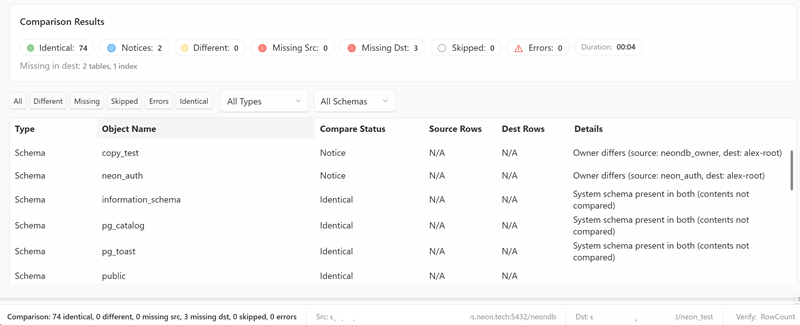
Each compared object gets a status:
| Status | Icon | Meaning |
|---|---|---|
| Identical | 🟢 | Same object, same definition/row count |
| Notice | 🟡 | Object matches structurally but carries a non-structural note (e.g. schema owner differs, partition CHECK normalization artifact). Does not count as a real difference |
| Different | 🟠 | Object exists on both but definition or row counts differ |
| Missing Source | 🔴 | Object exists on destination but not source |
| Missing Dest | 🔵 | Object exists on source but not destination |
| Skipped | ⚪ | Object exists in both but could not be compared (e.g. insufficient permissions) |
| Error | ⚠️ | Couldn't compare (permission issue, timeout) |
Notice vs Different
The Notice status is one level below Different. It indicates a cosmetic or environmental difference that does not represent a real structural divergence between the databases. Examples:
- A CHECK constraint expression that PostgreSQL decompiles differently across versions (normalized automatically)
- A CHECK constraint difference on a partition child (inherited from parent — the parent is the source of truth)
- Schema owner differences
Notices are shown in the results but do not count toward the "differences" total.
Comparison Modes
Same as validation modes:
- Row Count — fast, compares only
COUNT(*) - Checksum — compares MD5 of content
- Full — count + checksum
Export Report
After comparison, click Report in the toolbar to open the comparison report window. From its toolbar you can export results as:
- HTML — formatted report for sharing
- Markdown — for documentation or version control
- JSON — machine-readable format
- Copy to Clipboard — plain text summary
Use Cases
- Pre-copy check — see what's different before running a copy
- Post-copy verification — confirm the copy was successful
- Drift detection — check if staging has drifted from production
- Audit — document database state at a point in time