Options Reference
Configure what DbClone copies and how it behaves.
Object Selection
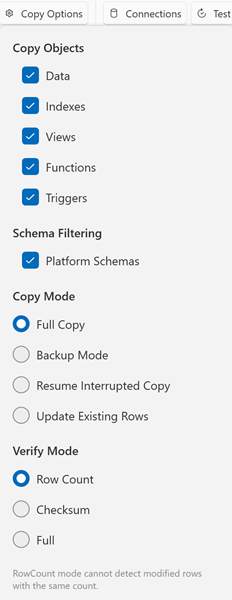
Toggle which object types to include in the copy:
| Option | Default | Description |
|---|---|---|
| Copy Data | ✅ On | Copy table rows (disable for schema-only clone) |
| Copy Indexes | ✅ On | Create secondary indexes. Primary key indexes are always created with the table structure and cannot be skipped |
| Copy Views | ✅ On | Create views |
| Copy Functions | ✅ On | Create functions and procedures |
| Copy Triggers | ✅ On | Create triggers |
Always copied
Constraints (foreign keys / check constraints), sequences, materialized views, RLS policies, and object comments are always copied — the current UI has no toggles for them.
Schema Filtering
| Option | Default | Description |
|---|---|---|
| Platform Schemas | ✅ On | Include platform-managed schemas (e.g. Supabase auth, storage, realtime). Uncheck to exclude schemas owned by non-login service roles. System schemas (pg_catalog, information_schema, pg_toast) are always excluded regardless of this setting |
Platform-Aware Schema Resolution
DbClone uses .platform definition files to determine which schemas and extensions belong to each hosting platform. When you connect, DbClone auto-detects the platform from the hostname and resolves the applicable schemas and extensions based on the server version.
| Platform | Detection Pattern | Default Port | SSL Mode |
|---|---|---|---|
| PostgreSQL (vanilla) | Fallback (no pattern match) | 5432 | Prefer |
| Supabase | *.supabase.co |
5432 | Require |
| Aiven | *.aivencloud.com |
11521 | Require |
| Neon | *.neon.tech |
5432 | Require |
Each platform definition includes version-specific entries that list:
- System schemas — engine-internal schemas always excluded (e.g.
pg_catalog,information_schema,pg_toast) - Platform schemas — provider-managed schemas excluded when "Platform Schemas" is unchecked (e.g. Supabase
auth,storage,realtime,graphql,vault, etc.) - Platform extensions — provider-managed extensions detected and skipped (e.g.
supabase_vault,pgsodium,pg_graphql,neon,aiven_extras)
Supabase definitions cover PostgreSQL 15, 16, and 17 with version-specific extension lists (e.g. PG 17 drops timescaledb, plv8, pgjwt).
The platform definition files are loaded from the platforms/postgresql/ directory in the installation folder. They can be updated without reinstalling the application.
Copy Mode
| Mode | Description |
|---|---|
| Full | Complete clone — drops and recreates everything |
| Resume | Skip DDL, copy only missing/mismatched data |
| Update | Same as Resume (sync stale tables) |
| Backup | Create a new timestamped database and full-copy into it |
See Copy Modes for detailed explanations.
Verification Mode
Controls how DbClone validates the copy after data transfer:
| Mode | Description |
|---|---|
| Row Count | Compare COUNT(*) per table (fast) |
| Checksum | Compare MD5 hash of table content (thorough) |
| Full | Row count + checksum |
Advanced Behavior
These values are built into DbClone and are not user-configurable (they may become options in a future release):
| Option | Behavior |
|---|---|
| Batch size | 5000 rows per batch — used for progress reporting and for the INSERT fallback when binary COPY fails |
| Command timeout | Built-in, per-operation values: 30 seconds for general SQL, 5 minutes for long-running DDL and data-transfer commands, 10 seconds for connection probes |
| Connection keepalive | A heartbeat query (SELECT 1) is sent between pipeline stages to prevent proxy idle timeouts |
Settings Persistence
All options are saved automatically when you change them. Settings file location:
Settings include:
- Selected copy mode
- Verification mode
- Object toggles (data, indexes, functions, views, triggers)
- Platform schemas toggle
- Window position and size
- Theme preference (light/dark/system)
- Last used source and destination connections
- Selected connection group
- Compare log pane state and height
- Default clipboard export format