Table Selection
By default, DbClone processes every table it has permission to access. With table selection you can choose exactly which tables a Copy, Compare, or Backup operation processes for a source database.
The control lives on the source connection panel:
- All Tables (built-in default) — no filtering; DbClone behaves exactly as before
- Named selections you create yourself (see Named Selections)
- A
*after the name (e.g.My Selection *) means the active selection has unsaved modifications
The Selection Dialog
Click Edit… on the source panel to open the table selection dialog:
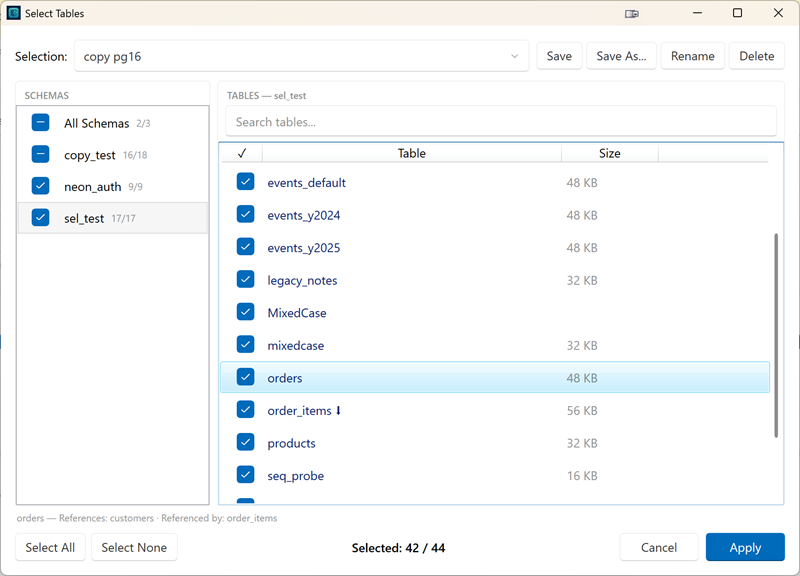
- Schema tree (left) — one checkbox per schema with a
selected/totalcount; an All Schemas entry shows every table in one list - Table list (right) — checkbox, table name, and estimated size; every column is sortable (sort by size to quickly find the largest tables)
- Search — filter tables by name within the current schema or across all schemas; searching never changes the selection itself
- Select All / Select None — act on the entire database, not just the currently filtered view
- Relationship explorer — highlight a table row to see its foreign-key relationships; dependent tables are marked, and tooltips show which tables the row references and is referenced by, including whether each related table is currently selected or excluded
Foreign-key behavior
- Unchecking a parent table asks for confirmation listing its dependent child tables, then deselects them automatically (recursively). This prevents orphaned child data that would violate referential integrity.
- Re-selecting a child table whose parent is still excluded highlights the row with a warning — the copy would break the FK relationship.
Validation summary
Before applying a selection, DbClone checks dependencies and shows a summary of what will be skipped during the operation:
- Foreign keys that reference excluded tables
- Views and materialized views that depend on excluded tables
- Orphaned partitions (partition selected but parent excluded, or vice versa)
The summary is informational only — you can Go Back and adjust, or Apply Anyway. If the selection is clean, no summary is shown.
Named Selections (Presets)
Selections are stored as named presets per source connection and database:
- Save overwrites the active preset; Save As… creates a new one
- Rename and Delete manage existing presets ("All Tables" cannot be changed or deleted)
- The last-used preset is restored automatically when you select the connection again
- Unsaved (dirty) modifications survive an application restart
Presets store the tables you unchecked — not an explicit include-list. Consequences:
- Tables added to the database later are included automatically (they're not in the exclusion list). If you don't want them, open the dialog and uncheck them.
- Tables that were deleted from the database are silently ignored.
How Operations Use the Selection
The active selection applies to Copy, Compare, and Backup alike. Objects that belong to an excluded table (its data, indexes, own foreign keys, triggers) are excluded with it. Sequences owned by an excluded table (identity/serial backing sequences) are excluded with the table; standalone sequences are not affected. Schemas, functions, types, and extensions are not affected by table selection.
Copy
Only the selected tables are created and copied. When the destination already contains data, DbClone asks how it should be cleaned:
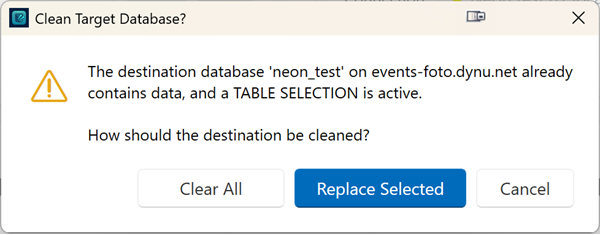
| Choice | Effect |
|---|---|
| Replace Selected (default) | Only the selected tables are dropped and re-created — all other destination tables remain untouched |
| Clear All | The entire destination is cleared — after the copy it contains only the selected tables |
| Cancel | Abort the operation |
Without a table selection, the classic Yes/No overwrite confirmation is used.
Compare
The selection defines the comparison scope on both sides:
- Target tables outside the selection are ignored and are not reported as differences
- Views depending on excluded tables are reported as skipped
- Non-table objects (sequences, types, functions, schemas) are still compared in full
Backup
Backup honors the selection — unselected tables are excluded from the backup file, and views depending on excluded tables are skipped with a warning.
Resume / Update
Resume and Update modes require "All Tables". While a non-default selection is active they are blocked with an explanation — switch back to All Tables to use them.
Dependency handling at runtime
When partial filtering is active, the operation skips affected dependents and reports them:
| Situation | Behavior |
|---|---|
| Selected table has an FK to an excluded table | That FK constraint is skipped, warning logged |
| View / materialized view depends on an excluded table | View is skipped, warning logged |
| Partition selected but parent excluded (or vice versa) | Orphaned partition is skipped, warning logged |
| Trigger on an excluded table | Automatically excluded with the table |
If the active selection excludes every table in the source database, the operation fails immediately instead of copying nothing.
Destination Table Overview
The destination panel offers a separate read-only overview of all tables currently on the output database, including a database picker when the destination connection has no database name — see Table Overview (Destination).