The Main Window
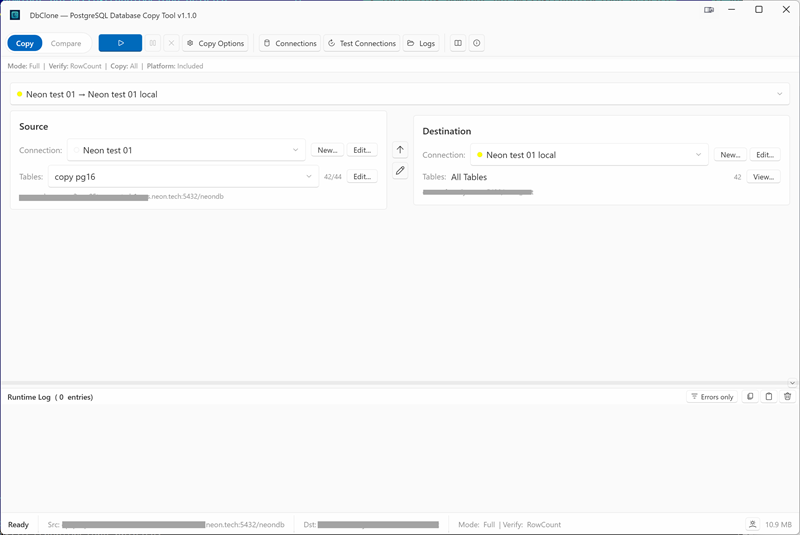
From top to bottom:
Toolbar
From left to right:
- Mode selector — segmented Copy | Compare switch
- Run controls (depend on the mode):
- Copy mode: ▶ Start Copy (Ctrl+S), Pause/Resume (Ctrl+P), Stop (Esc), and Copy Options — a popup with object toggles, Platform Schemas, copy mode, and verify mode
- Compare mode: ▶ Run Compare (Ctrl+Shift+C), Pause/Resume, Stop, Compare Options (verify mode, Platform Schemas), and Report — opens the last comparison report
- Connections — opens the Connection Manager
- Test Connections — tests the current source and destination connections
- Logs — opens the application log folder
- Help (F1) — opens this documentation; About — version info
See Keyboard Shortcuts for the full list.
Banners
- The notification banner shows the result or blocking message of the active workflow (errors, warnings, completion)
- The update banner appears when a newer version is available
Mode Info Strip
A compact summary of the active settings so you always see what will run:
The same strip in Compare mode shows the comparison's verify and platform settings. Change any of these in the Copy Options / Compare Options popup on the toolbar — see Options Reference.
Connection Group Selector
The dropdown above the two panels selects a connection group — a saved source → destination pair — and switches both panels at once.
Source Panel
| Control | Purpose |
|---|---|
| Connection dropdown | Picks the saved source connection (color indicator shown) |
| New... / Edit... | Opens the Connection Manager to add or edit connections |
| Tables dropdown | The active table selection: All Tables or a named preset; * marks unsaved modifications |
| Edit… (next to Tables) | Opens the table selection dialog |
| Summary line | Host and database of the selected connection |
Destination Panel
| Control | Purpose |
|---|---|
| Connection dropdown | Picks the saved destination connection |
| New... / Edit... | Opens the Connection Manager |
| Tables row | Shows All Tables, a table count, and View… — opens the read-only Table Overview of the output database |
If the destination connection has no database name, the row shows (no database) — you can pick one from the Table Overview dialog.
Group Buttons
The two buttons between the panels create a group from the current connections or edit the current group.
Progress & Results
- In Copy mode this area shows the pipeline progress: current stage, per-table progress, object status sidebar — see Reading the Progress Panel
- In Compare mode it shows the comparison results grid — see Database Comparison
Log Panel
The collapsible panel at the bottom streams the full operation log. Drag the splitter to resize it.
While an operation is running
Connections, connection groups, the table selection, and copy/compare options are disabled until the operation finishes.